Never write meeting minutes again.
Record your meeting and receive detailed, professional minutes automatically via email. Simple, fast, and GDPR compliant.


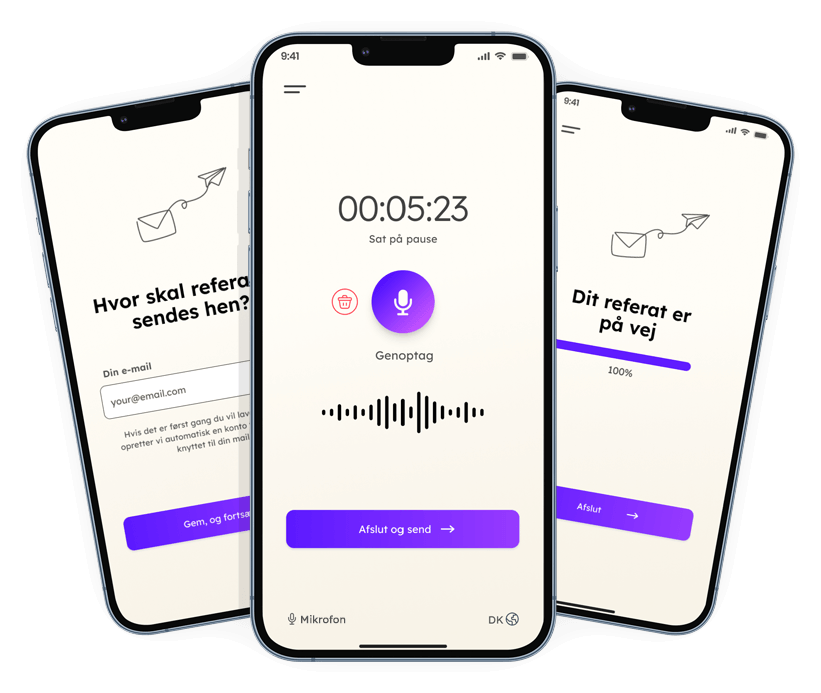
Record your meeting and receive detailed, professional minutes automatically via email. Simple, fast, and GDPR compliant.
No setup – just tap record, and get your minutes.
Place your phone on the table and tap the record button. That's it.
When your meeting ends, simply stop the recording.
Get professionally formatted meeting minutes delivered to your email within minutes.
All data processing takes place on Microsoft Azure servers in Sweden (EU). Audio recordings and generated text are deleted as soon as the minutes are sent via email. Data is not shared with third parties and is not used to train AI models. MinuteMate complies with EU data protection regulations (GDPR). MinuteMate is provided by the Danish company Alia.
Not just a transcript. Clear meeting minutes with agreements, tasks and organised by topic.
Summary
We reviewed the project status, budget and marketing campaign. Specific tasks with deadlines were agreed, and the project deadline was confirmed.
Agreements and tasks
Topics
Next steps
In-person meetings that require documentation – from the staff meeting at the institution to the site meeting on the construction site. What they all share: the minutes write themselves.
Staff meetings, team meetings and board meetings. Documentation requirements are high – and GDPR is a must.
Site meetings and client agreements. What is agreed on site becomes emailed minutes before you are back in the van.
Say "Agenda" out loud during your board meeting, and the minutes follow the agenda items. Decisions and owners are highlighted.
Focus on the client instead of the notepad. The minutes arrive automatically before you are back at the office.
Record the board meeting or the general assembly. The minutes are ready to share with residents.
Parish council and committee meetings with a fixed agenda. The minutes are ready for the website right after the meeting.
Choose what suits you
excl. VAT
Billed monthly · no commitment
Billed annually · €48
Includes
5 hours / 300 minutes
3 meetings per month
excl. VAT
Billed monthly · no commitment
Billed annually · €96
Includes
20 hours / 1,200 minutes
Unlimited meetings
Full transcription attached
Data processing agreement
excl. VAT
Billed monthly · no commitment
Billed annually · €180
Includes
Unlimited hours*
Unlimited meetings
Full transcription attached
Data processing agreement
More users? Team from 5 users with a single invoice and admin dashboard — contact us.
*Max has a fair use limit of 100 hours per month. Contact us if you need more hours.
Everything you need to know about AI meeting minutes
An AI minute is automatically created by an AI model (artificial intelligence) based on an audio recording. With MinuteMate App, you can record your meeting and receive the minutes via email - within minutes after the meeting ends. You should always be aware of whether the AI being used complies with GDPR. Our MinuteMate app does. All data processing takes place with Microsoft Azure in the EU (Sweden).
MinuteMate app supports Danish, as well as Norwegian, Swedish, and English. The AI transcribes and creates minutes in the language you select.
There is a big difference between AI meeting minutes apps. With the vast majority, you don't know which AI models are being used, whether AI models are trained on your data, or whether your data is sent via the USA or another country outside the EU. This is a real risk.
That's why we've chosen the most secure approach.
The MinuteMate app from Alia ensures that all data processing takes place in Sweden and within the EU. This is possible because Microsoft has an agreement with OpenAI, so the AI model physically resides in the data center in Sweden. This means we can use the currently best language model for transcription, which is Whisper from OpenAI - while ensuring that data is only processed within the EU. If you choose one of our business plans, a data processing agreement is therefore also included.
MinuteMate app complies with GDPR. All data is processed in the EU (Sweden), audio recordings are deleted immediately, and no meeting content is stored permanently.
AI minutes are not necessarily identical to manual minutes – but they are often more consistent, much faster, and typically capture more details.
Our MinuteMate app uses advanced AI to identify decisions, tasks, topics, and people. The minutes can be edited as needed - and with the Standard and Pro plans you can enable receiving the full transcription attached, so you always have the complete source material to go back to.
MinuteMate delivers minutes as plain text, so you can copy and edit it in your preferred program. Both minutes and transcription are sent via email.
In MinuteMate app, you record your meeting and receive both minutes and transcription via email within minutes after the meeting. Under "Settings" you can choose whether the transcription should be attached in the email. This option is available on Standard and Pro plans.
MinuteMate app uses Azure Whisper for transcription and Azure GPT-4 for summarization. The Whisper model is known to be the best for Danish speech. Accuracy depends on how close the microphone is to the meeting participants. Place your phone close to the participants, the microphone is located at the bottom of the phone. You can also connect an external microphone via Bluetooth.
Speech-to-text provides verbatim transcription. MinuteMate app creates both transcription and structured minutes with decisions, action items, and summary.
MinuteMate app offers a free starter period with 3 hours and up to 3 meetings. After that, you can continue for free with 50 minutes per month, or upgrade to Mini, Standard, or Pro for more time and meetings.
MinuteMate app is available in the App Store for iPhone and iPad. Search for "MinuteMate" or "AI minutes" to download the app.
MinuteMate app is available in Google Play for Android devices. Search for "MinuteMate" in Google Play to install the app.
Download MinuteMate and get more time for what matters.